Anansi for SAP - By Maya Data Privacy Limited
Connect your SAP HANA databases to Anansi and unlock full metadata visibility — from schemas and tables to columns and keys — for data lineage, governance, and cataloging.
What Is the SAP HANA Integration?
The SAP HANA Integration for Anansi allows you to connect directly to your HANA instances and pull in the full structural metadata — schemas, tables, columns, primary keys, and foreign keys — so that you can visualize data lineage, catalog your data assets, and maintain an always-current picture of your database landscape.
Whether you're onboarding a new HANA database for the first time or keeping an existing catalog in sync as your schemas evolve, this integration handles it end-to-end through a simple, guided wizard.
Key Capabilities
- Direct SAP HANA Connectivity — Connect using Host, Port, User, and Password. Supports both single-container and multi-tenant database container (MDC) configurations.
- SSH Tunnel Support — Reach HANA instances inside private networks or behind firewalls through an encrypted SSH bridge.
- Automated Metadata Import — Pull in all schemas, tables, columns, and key relationships in a single operation using a guided 3-step wizard.
- Incremental Metadata Sync — Keep your catalog up-to-date as your HANA schemas change. Anansi detects additions, modifications, and deletions — without re-importing from scratch.
- Downloadable Audit Reports — Every import and sync run produces a detailed plaintext report you can download for compliance and governance records.
- Data Lineage Visualization — Once metadata is imported, visualize how data flows through your SAP HANA environment using Anansi's interactive lineage graph.
Architecture Overview
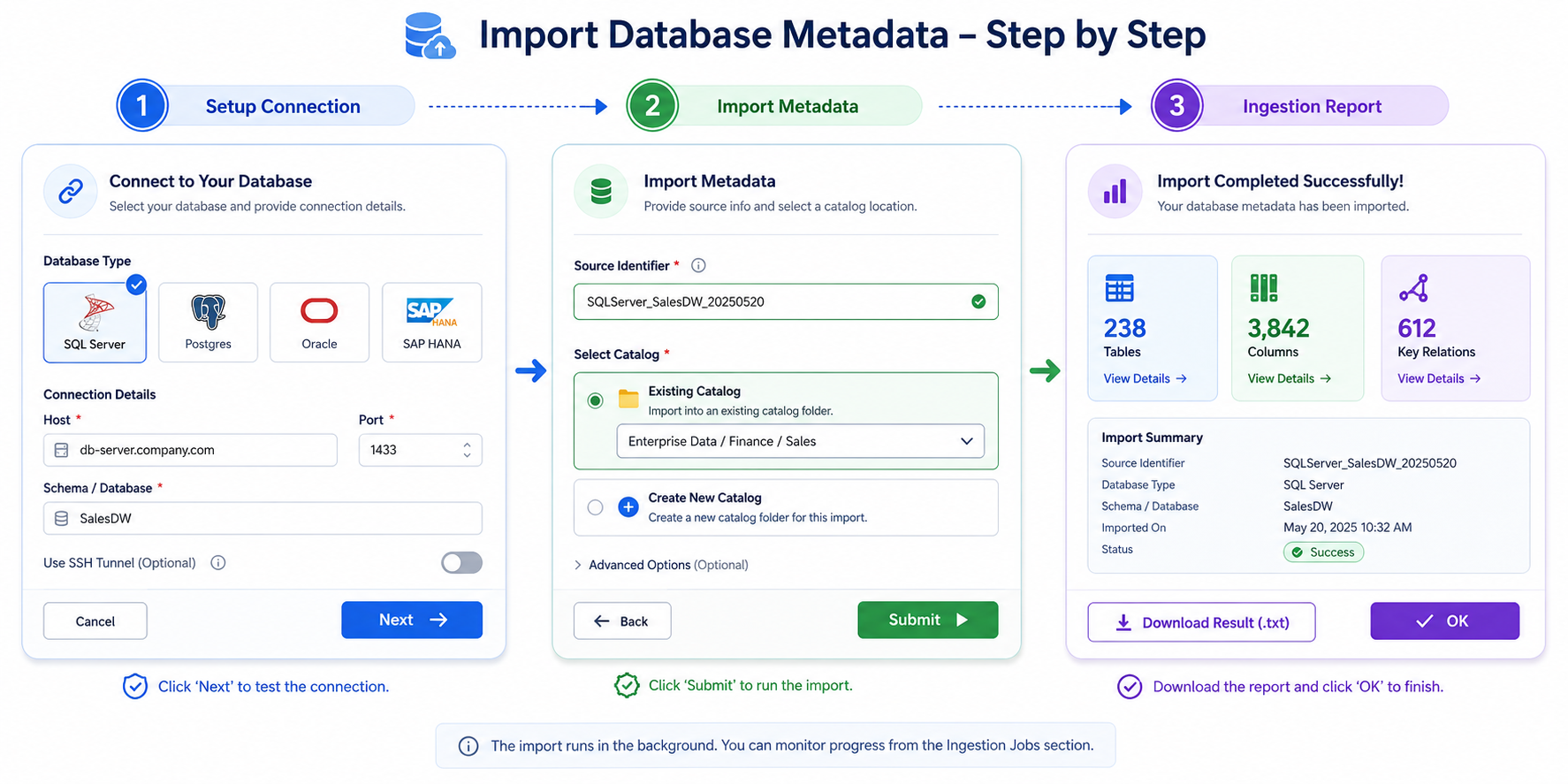
The diagram above illustrates the high-level flow of how Anansi connects to your SAP HANA database, retrieves structural metadata, and populates your data catalog for lineage mapping.
Data Lineage Visualization
Once your SAP HANA metadata has been imported into Anansi, you can explore your entire database landscape through an interactive, visual lineage graph. This is one of the most powerful features of the integration — it transforms raw schema metadata into a living map of how your data is structured and connected.
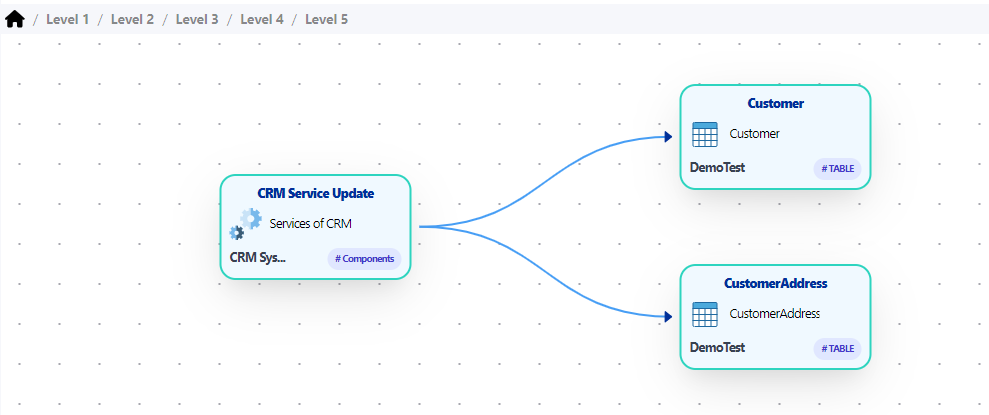
With Anansi's data lineage visualization, you can:
- Trace data flow end-to-end — Follow how data moves from source tables through transformations to downstream consumers. Understand which tables feed into which, and how column-level dependencies are connected.
- Explore upstream and downstream impact — Click on any table or column to instantly see everything that feeds into it (upstream) and everything it impacts (downstream). This makes change impact analysis fast and reliable.
- Navigate multi-level hierarchies — Drill into your lineage graph across multiple levels — from high-level schema overviews down to individual column relationships and key constraints.
- Identify data quality risks — Spot orphaned tables, missing foreign key relationships, or unexpected dependencies that could indicate data quality issues in your HANA environment.
- Support governance and compliance — Use the visual lineage as evidence for regulatory audits, data governance reviews, and privacy impact assessments — critical for SAP environments handling sensitive enterprise data.
The lineage graph updates automatically each time you run a metadata sync, ensuring your visualizations always reflect the current state of your SAP HANA database.
Prerequisites
Before you begin, ensure the following:
| Requirement | Details |
|---|---|
| Anansi Account | You need an active Anansi account with permissions to access Data Integration features. |
| SAP HANA Credentials | Host address, port number, database user, password, and the schema name you wish to import. |
| Network Access | Your Anansi instance must be able to reach the SAP HANA server — either directly or via an SSH tunnel. |
| HANA Port | Know your instance number to determine the correct port (e.g., 30015 for instance 00 tenant DB, 30013 for system DB). |
Getting Started
Follow these three guides in order to set up your SAP HANA integration:
- Setup Connection — Configure your SAP HANA database credentials and verify connectivity.
- Import Metadata — Import your database structure (schemas, tables, columns, keys) into an Anansi catalog for the first time.
- Sync Metadata — Keep your catalog up-to-date as your SAP HANA schemas evolve over time.